
Send Bulk Text from Salesforce
If you already use Salesforce to manage your customers, Leads, Contacts and business activities, you can also use it to send bulk text messages without moving your customer data to another system.
When you send bulk text from Salesforce, you can reach a group of customers at once while keeping your messaging activity connected to the relevant Salesforce records. This can make reminders, updates and customer communications easier to manage.
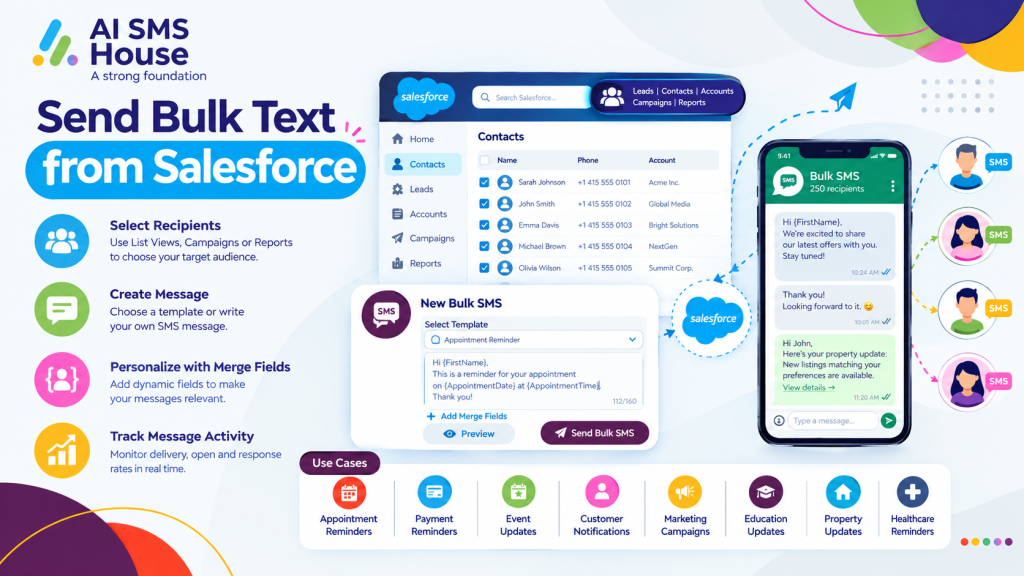
Send Bulk Text from Salesforce
Sending bulk text messages from Salesforce usually starts with selecting the people you want to contact. You can use Salesforce List Views, Campaigns or Reports to create a suitable audience.
The basic process is:
1 Select Leads, Contacts or other Salesforce records.
2 Create your recipient list using a List View, Campaign or Report.
3 Choose an SMS template or write your message.
4 Use merge fields to personalise the message where needed.
5 Check the recipients and message content.
This gives you a simple way to manage bulk communication while keeping customer information within your Salesforce environment.
How to Send Bulk Text from Salesforce
The exact steps depend on the Salesforce messaging solution you use, but the overall process is straightforward.
First, make sure your Salesforce records contain the correct mobile numbers and any required consent information. You can then create a recipient list based on criteria such as customer type, location, account status or campaign.
Next, prepare your text message. A template can save time when you regularly send similar messages. You can also use merge fields to include information such as the customer’s name, appointment details or reference number.
Basic Use Cases to Send Bulk Text from Salesforce
Bulk texting can be useful when you need to communicate with several customers at the same time.
Common use cases include:
Appointment reminders: Remind customers about upcoming appointments or meetings.
Payment reminders: Send payment or invoice reminders to customers.
Event updates: Keep event attendees informed about changes, timings or important information.
Customer notifications: Share service updates, confirmations or other important messages.
Marketing campaigns: Send promotional messages to customers who have given the required permission.
Education updates: Contact students, parents or applicants about important dates and updates.
Property updates: Keep buyers, tenants or property enquiries informed about viewings and updates.
Healthcare reminders: Send appointment or service reminders where appropriate consent and privacy requirements are met.
Personalise Bulk Text Messages in Salesforce
Bulk does not have to mean sending the exact same message to everyone. You can use Salesforce information to personalise your texts.
If you want to explore the Salesforce messaging app, you can view AI SMS House on Salesforce AppExchange.
Manage Bulk Text Messages in Salesforce
A Salesforce messaging solution can also help you keep communication organised. With AI SMS House, you can manage SMS conversations alongside Salesforce records and monitor message activity.
Application House provides Salesforce-focused solutions and can help businesses make better use of Salesforce automation and connected applications.
When you send bulk text from Salesforce, you can reduce the need to switch between different systems and keep your customer communication closer to the records your team already uses.