
Send Automated Text Messages from Salesforce
When you have customer information already stored in Salesforce, you can use it to send timely text messages without asking your team to handle every message manually. Send Automated text messages from Salesforce by connecting SMS communication with your Salesforce records, workflows and customer activities.
This can be useful when you need to follow up quickly, remind customers about appointments or keep people updated about changes to their records.
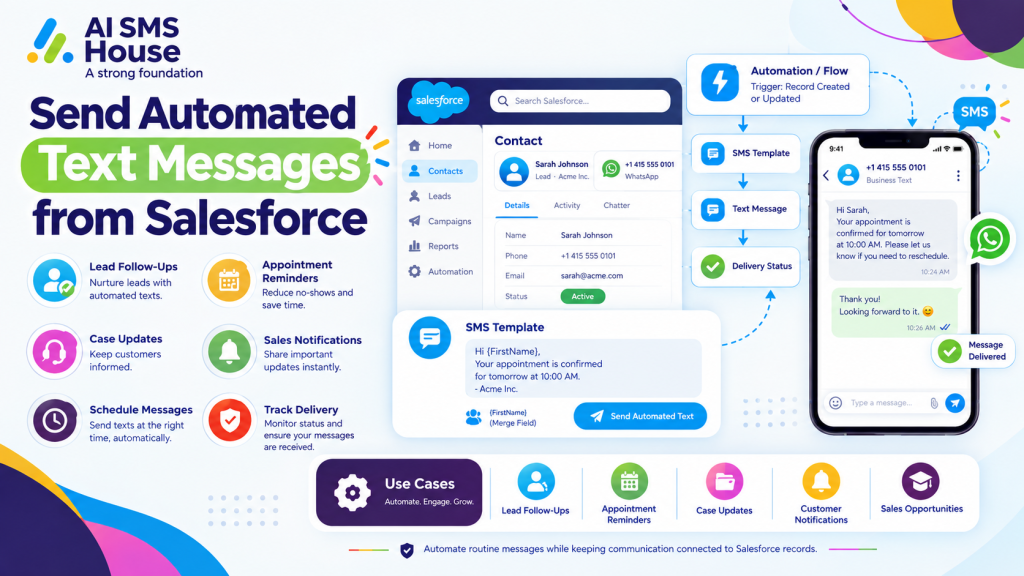
How to Send Automated Text Messages from Salesforce
The process can be built around Salesforce automation. You decide what event should trigger a message, create the message you want your customer to receive, and let the system handle the rest.
A typical process looks like this:
A record is created or updated in Salesforce.
Salesforce checks the conditions you have set.
An automation, such as Salesforce Flow, triggers the message.
The appropriate SMS template is selected.
The text is sent to the customer’s mobile number.
The message status can be tracked from Salesforce.
For example, when a new Lead is added, you could automatically send a welcome text with a link to your website or booking page.
How Automated Text Messages from Salesforce Help Your Business
Automated messaging can save your team from repeating the same communication throughout the day. More importantly, it helps you contact customers when the information is most relevant.
Improve Lead Follow-Up
If someone submits an enquiry, you do not always want them waiting for a sales representative to respond.
You can use an automated text to:
Confirm that you received the enquiry
Thank the person for getting in touch
Share a booking link
Provide the next steps
Remind a sales representative to follow up
This gives the customer an immediate response while your sales team prepares a more personal follow-up.
Send Appointment Reminders
If your business manages appointments, you can automate reminders directly from Salesforce.
For example, you could send a text the day before an appointment with the date, time and location. You can also send a reminder on the morning of the appointment.
This can help reduce missed appointments and means your staff do not have to send each reminder manually.
Send Automated Text Messages from Salesforce for Customer Updates
You can also use Salesforce automation to keep customers informed when something changes.
For example, a business could send an SMS when:
A service request is received
A Case status changes
An order or service update is available
Additional information is required
A request has been completed
Instead of your team checking records and sending individual messages, the notification can be triggered by the Salesforce record itself.
Support Sales and Customer Retention
Automated texts are not only useful for new leads. You can also use them after a sale or during ongoing customer relationships.
For example, you could send a thank-you message after an Opportunity is marked as Closed Won, followed by a useful follow-up message at a later stage.
You can also use automation for renewal reminders, service notifications and other regular customer communications.
How AI SMS House Works with Salesforce
AI SMS House helps you bring SMS communication into your Salesforce processes. You can connect text messaging with Salesforce records and use automation to send messages based on customer or business activity.
This means you can keep your customer data and messaging activity connected rather than moving information between different systems.
Application House provides Salesforce-focused solutions and can help businesses make better use of Salesforce automation and connected applications.
Why Use Automated SMS in Salesforce?
The main benefits include:
Save time: Reduce repetitive manual texting.
Respond faster: Send an immediate message when a customer takes action.
Keep customers informed: Provide useful updates at the right time.
Improve follow-up: Make sure important messages are not forgotten.
Keep communication connected: Link messaging activity with Salesforce records.
If you want to explore the Salesforce messaging app, you can view AI SMS House on Salesforce AppExchange.
Final Thoughts
When you send automated text messages from Salesforce, you can make everyday customer communication quicker and easier to manage.
From lead follow-ups and appointment reminders to Case updates and customer notifications, you can build SMS into the processes your team already uses. Your staff can spend less time sending routine messages and more time dealing with customers who need personal attention.