
Send Automated SMS messages from Salesforce
If you already use Salesforce to manage leads, contacts, customers or cases, you may want to send SMS messages without manually copying phone numbers or moving between different systems.
With the right Salesforce SMS solution, you can send automated SMS messages from Salesforce
whenever something happens in your Salesforce records. For example, you can send a welcome message when a new lead is created, a reminder before an appointment, or a follow-up after a customer interaction.
You can set these processes up using Salesforce Flow, allowing you to automate routine messages while keeping the communication connected to the relevant Salesforce record.
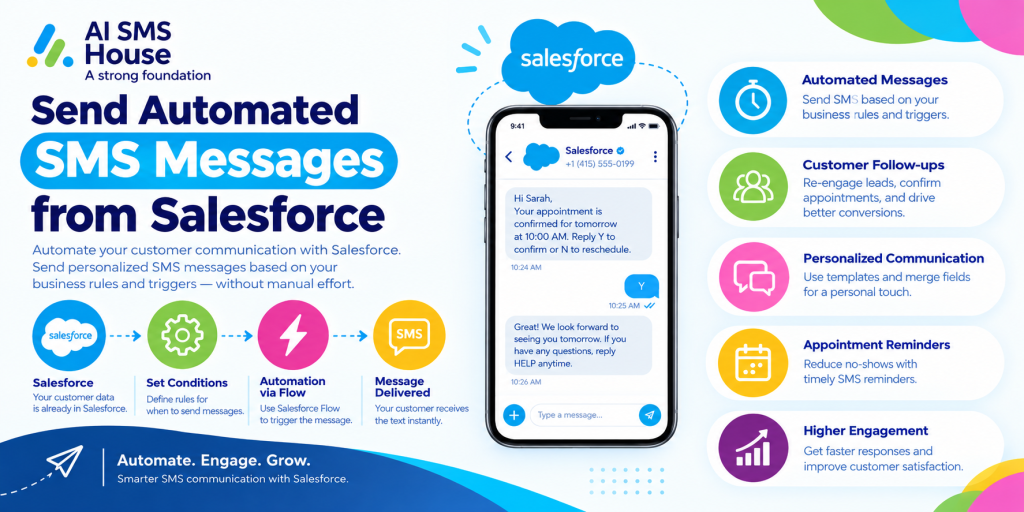
Send Automated SMS Messages from Salesforce: How Does It Work?
The process is simple and can be adapted to your existing Salesforce workflow.
1. Connect SMS with Salesforce
First, connect Salesforce with an SMS messaging solution such as AI SMS House. This allows you to send SMS messages from Salesforce records, including Leads, Contacts, Accounts, Cases and other Salesforce objects.
Once connected, your team can manage SMS communication without relying on a separate messaging system.
2. Create an SMS Template
You can create templates for messages you send regularly.
Salesforce fields can be used to personalise each message. This means you can automatically include information such as the customer’s name, appointment date or case reference.
3. Set Up Salesforce Flow
The next step is to decide when you want the SMS to be sent.
Using Salesforce Flow, you can create conditions such as:
1 When a new Lead is created.
2 When a Contact is added.
3 When a Case status changes.
4 When an Opportunity reaches a particular stage.
5 When an appointment is created.
6 When a specific Salesforce field is updated.
Once the conditions are met, the Flow can trigger the SMS automatically.
4. Send the SMS Automatically
After the Flow is triggered, the selected SMS template can be sent to the relevant phone number.
You do not need to manually find the contact, copy their number or type the same message again.
5. Track SMS Activity
You can keep the messaging activity connected to the relevant Salesforce record. This gives your team visibility of what has been sent and helps them understand the latest customer communication.
Send Automated SMS Messages from Salesforce: Common Use Cases
There are many situations where automated SMS can make everyday Salesforce processes easier.
Lead Follow-Up
When a new lead enters Salesforce, you can automatically send a short acknowledgement.
For example, you could let the person know that you have received their enquiry and that someone from your team will contact them.
Appointment Reminders
You can automatically send an SMS before an appointment.
For example:
Appointment confirmation when it is booked.
Reminder one day before the appointment.
Reminder a few hours before the appointment.
Follow-up message after the appointment.
Case Updates
When a Salesforce Case changes status, you can trigger an SMS to keep the customer informed.
For example, you could send a message when a case is received, assigned or resolved.
Customer Follow-Ups
You can create an automated follow-up after a specific Salesforce activity.
For example, after a sales call, you could send a thank-you message or provide a useful link.
Payment or Order Updates
If your Salesforce process tracks payments or orders, you can trigger SMS notifications when the relevant record changes.
This can help keep customers informed without requiring your team to send every update manually.
Why Use Automated SMS in Salesforce?
The biggest benefit is that SMS becomes part of the process you already manage in Salesforce.
Instead of relying on your team to remember every message, you can define the conditions once and let Salesforce handle routine communication.
AI SMS House, from Application House, can help you connect SMS messaging with Salesforce, automate communication and keep messaging activity associated with your Salesforce data.
Final Thoughts
If your team regularly sends similar SMS messages, automation can save time and make communication more consistent.
By combining Salesforce Flow with an SMS solution, you can send automated SMS messages from Salesforce at the right point in your workflow while keeping your customer communication connected to Salesforce.
If you’re looking for an easy way to automate SMS messages from Salesforce, explore the AI SMS House Salesforce messaging app on Salesforce AppExchange.