
Send Automated SMS from Salesforce
Customers do not always want to wait for an email or phone call. When they need an appointment reminder, order update, follow-up or important notification, a SMS message can often reach them quickly.
If your business uses Salesforce, you can automate these communications based on what happens inside your CRM. You can set up messages to send when a record is created, updated or reaches a particular stage.
With AI SMS House, you can connect SMS messaging with your Salesforce processes and create automated customer communications without manually sending every text. Application House can also help businesses implement and configure Salesforce solutions around their business requirements.
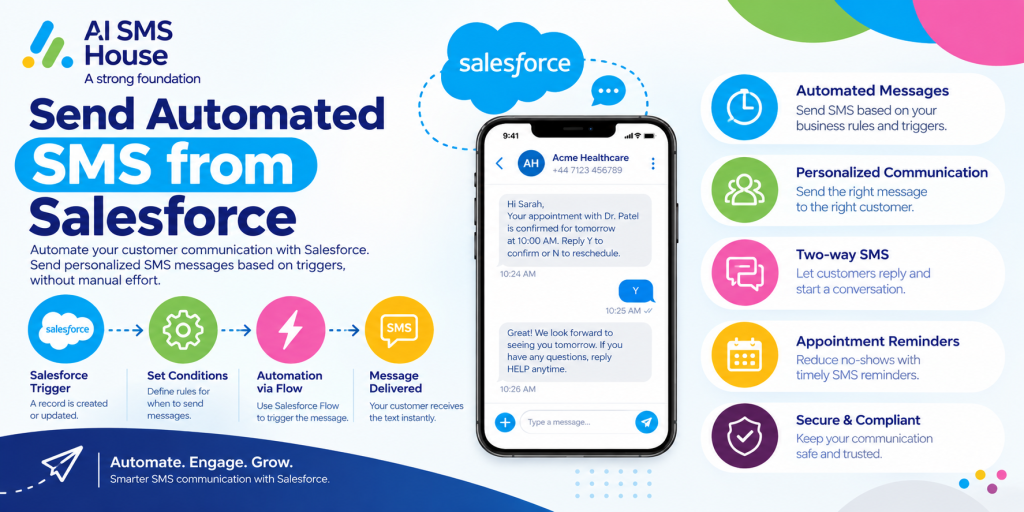
Send Automated SMS from Salesforce: How Does It Work?
When you send automated SMS from Salesforce , you create rules or automations that trigger a SMS message when a specific event happens.
The basic process usually works like this:
- A Salesforce record is created or updated.
- A defined condition is met.
- Salesforce Flow or another automation identifies the trigger.
- Your SMS solution receives the instruction.
- A SMS message is automatically sent to the relevant mobile number.
- The message activity can be recorded against the Salesforce record.
This means you do not need your team to remember every routine message. Once the automation is configured, Salesforce can trigger the communication at the right point in your process.
Common Triggers You Can Use for SMS Automation
You can automate messages based on many different Salesforce activities, including:
- New Lead creation
- Lead status changes
- New Case creation
- Case status updates
- Opportunity stage changes
- Appointment dates
- Task deadlines
- Custom object updates
- Payment reminders
- Document requests
- Customer onboarding stages
Why Send Automated SMS from Salesforce?
Manual messaging can take up a surprising amount of time. Your team may need to check records, find phone numbers, write messages and remember when to follow up.
When you send automated SMS from Salesforce, you can:
- Reduce repetitive manual work
- Send timely updates to customers
- Create consistent communication processes
- Reduce the risk of forgotten follow-ups
- Keep messaging connected to your CRM
- Trigger messages based on real Salesforce activity
- Support sales and customer service teams
You still control the automation rules and decide exactly when messages should be sent.
Use Cases for Automated SMS in Salesforce
Here are some practical ways you can use automated SMS messaging in your Salesforce processes.
Lead Follow-Up
A new lead submits an enquiry through your website. Instead of waiting for a sales representative to send the first message, you can automatically send a confirmation.
Appointment Reminders
Missed appointments can affect your team’s schedule. You can set up an automated reminder before an appointment.
Send Automated SMS from Salesforce for Appointment Reminders
Your automation could check the appointment date and send a message 24 hours before the scheduled time.
Customer Onboarding
When a customer becomes active, they may need several updates during the onboarding process.
You can automate messages when important stages are completed, such as:
- Welcome message
- Account setup confirmation
- Document request
- Training reminder
- Next-step notification
Each message can be linked to a change in the relevant Salesforce record.
Sales Opportunity Updates
Sales teams often need to follow up when an opportunity reaches a particular stage.
You could automate internal or customer-facing messages when:
- A quote has been prepared
- Additional information is required
- A meeting needs to be scheduled
- An opportunity has been won
- A new customer needs a welcome message
The automation can use Salesforce data to decide when the SMS should be triggered.
Case and Customer Service Notifications
You can also use automated SMS for customer service.
For example, when a customer creates a support case, Salesforce can trigger an acknowledgement message. Further messages could be sent when the case status changes.
How AI SMS House Supports Salesforce SMS Automation
AI SMS House is designed to help you send SMS from within Salesforce and automate messaging around your Salesforce processes.
Depending on your setup, you can use automation to trigger messages based on record activity and business conditions. This can help you build messaging into your existing workflows rather than managing communications separately.
For example, you can use Salesforce Flow to define when a message should be sent and what conditions need to be met.
If you want to explore the Salesforce messaging app, you can view AI SMS House on Salesforce AppExchange.
View AI SMS House on Salesforce AppExchange
A simple automated process could look like this:
- A Lead is created in Salesforce.
- The Lead has a valid mobile number.
- The Lead source meets your chosen criteria.
- Salesforce Flow triggers the automation.
- AI SMS House sends the SMS.
- Your team continues managing the customer journey in Salesforce.
Application House can support businesses looking to configure Salesforce automation and align their CRM processes with their communication requirements.
Things to Consider Before You Send Automated SMS from Salesforce
Before creating your automation, it is important to plan the customer journey.
Consider:
- What event should trigger the message?
- Who should receive it?
- Is the message relevant at that stage?
- How often could the customer receive messages?
- Does your business have the appropriate permission to send SMS?
- What should happen if the customer’s details are missing or incorrect?
- Should the message be personalised with Salesforce data?
You should also avoid automating messages simply because you can. The most useful SMS messages are timely, relevant and connected to something the customer expects.
Final Thoughts
When you send automated SMS from Salesforce, you can turn important Salesforce activity into timely customer communication. Instead of relying on your team to remember every confirmation, reminder or follow-up, you can build defined messaging steps into your CRM process.
From lead follow-ups and appointment reminders to onboarding and customer service updates, automated SMS can support many everyday business processes.
With AI SMS House, you can bring SMS messaging into your Salesforce workflow, while Application House can help support the wider Salesforce implementation and automation strategy. The key is to start with clear use cases, choose the right triggers and make sure every automated message provides useful information to the person receiving it.