
Configure SMS Opt Out Using Any Object, Any Field
Your Salesforce data model already reflects how your organisation manages borrowers, buyers, students, patients and other audiences. You should be able to connect SMS opt out to that model without relocating your preferences to a fixed record or package field.
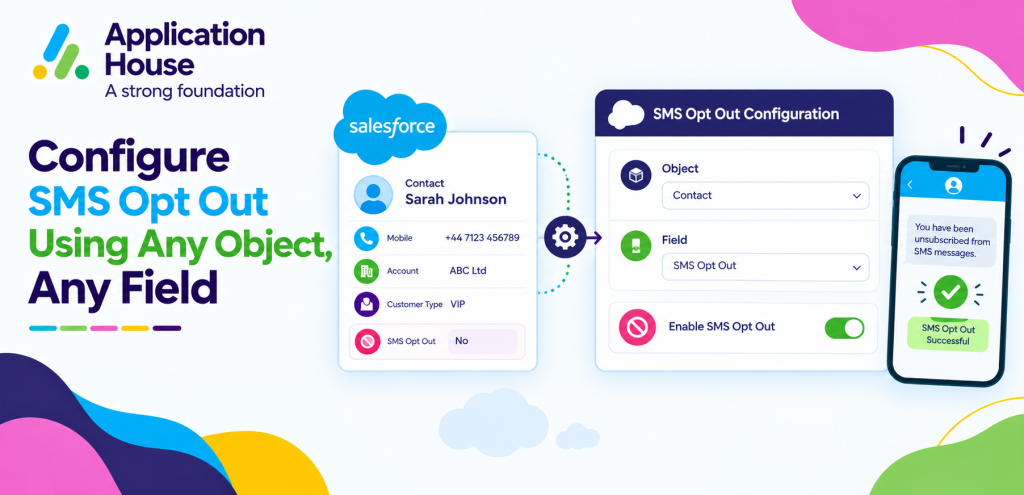
With AI SMS House, you can identify the standard or custom object that should own the preference and the field that should carry it. Your choice lets you keep the opt out decision close to the record, process and team that rely on it.
You can apply the same configurable approach to SMS, text messages and WhatsApp while your organisation decides which record provides the right source for each channel.
What Does Any Object, Any Field Mean for SMS Opt Out?
Your administrator can nominate the object that represents the recipient or business relationship for your SMS process. You might use a standard Salesforce record such as a Lead or Contact, or you might use your own object for a mortgage application, property enquiry, student enrolment, pharmacy service or hospital appointment.
Your administrator can then nominate the field that your organisation wants AI SMS House to read as the SMS opt out decision. You can build around your current data structure instead of maintaining a second preference location only for messaging.
Your selected field remains part of your Salesforce design, so you can give your users a familiar place to review and maintain the decision.
How to Configure SMS Opt Out Using Any Object, Any Field
Your configuration begins with a business decision rather than a package restriction. You decide which record owns the communication preference, which field represents the decision and which messaging process should use it.
Decide Whether the Preference Belongs to a Person or a Process
Your first decision is whether the preference belongs to a person or to a specific business process. You can place an organisation-wide Salesforce SMS opt-out decision on a Lead or Contact when your policy treats the recipient consistently across your business.
You can place a process-specific decision on your custom record when your policy treats each relationship separately. You should confirm that your chosen scope follows the consent rules and communication policies that apply to your organisation.
Choose Your Salesforce Source of Truth
Your selected object should be the record your team trusts when deciding whether a message may be sent. You reduce ambiguity when your users can find the preference where they already manage the related work.
You can choose a standard object when your relationship is already represented by a Lead, Contact, Account, Case or Opportunity. You can choose a custom object when your organisation manages communication around a specialised service, application, booking or transaction.
Select the Field Your Organisation Already Understands
Your current Salesforce field can become the reference for your SMS opt out decision. You can select the field that your administrators and users already recognise instead of introducing an unfamiliar field solely for your messaging app.
Your field name can follow the language your organisation uses internally. You can therefore keep your messaging configuration aligned with your established terminology and ownership.
Test Every Way Your Messages Can Begin
Your testing should cover every method your teams use to communicate. You can test one to one messages, bulk communication, scheduled messages, Salesforce Flow and Agentforce AI Agent conversations against your intended object and field.
You can confirm that each sending route reaches the correct record before your users begin working with the configuration.
Where Can You Store SMS Opt Out in Salesforce?
Your object choice depends on where your organisation manages the relationship and how widely your preference should apply.
Lead
You may choose your Lead when your prospect has not yet converted. You keep your early stage SMS preference with your sales enquiry.
Contact
You may choose your Contact when your preference should follow an individual across several processes. You give your teams one familiar person record to consult.
Account
You may choose your Account when your approved process manages communication at an organisation or household level. You align your field with the customer structure your team already uses.
Case
You may choose your Case when your messaging relates to a particular support process. You keep your decision close to the service context your users need.
Custom Object
You may choose your custom object when your industry process has its own Salesforce record. You connect your opt out decision to your mortgage application, property enquiry, enrolment, pharmacy service or hospital appointment.
You should treat these examples as design options and confirm that your final structure meets your legal and organisational requirements.
Mortgage SMS Opt Out Using Your Mortgage Application Object
Your mortgage operation may manage communication against both a borrower and a mortgage application. You can decide whether your SMS opt out field belongs on the Contact or on your Mortgage Application object according to the scope defined by your policy.
If your borrower preference applies across every mortgage conversation, you can keep your chosen field on the Contact. If your decision relates to one application journey, you can configure your Mortgage Application object as the relevant source.
Your advisers can then review the decision within the record they use for document reminders, valuation updates or application progress. You avoid asking your advisers to maintain the same preference in an unrelated location.
Pharmacy SMS Opt Out Using Your Service Record
Your pharmacy may already manage prescription collection, repeat services or customer notifications on a dedicated Salesforce record. You can select that record and the field your pharmacy team treats as authoritative.
Your SMS process can then refer to your chosen field when you prepare collection notices, service updates or other permitted messages. You keep preference ownership within your operational model instead of asking your team to duplicate the value elsewhere.
Your pharmacy can also choose a person record when your communication policy requires one preference across every service. You retain the flexibility to match your configuration to the way your pharmacy actually works.
Configure Text Message Opt Out Using Any Object, Any Field
Your users may describe mobile communication as text messaging even when your technical channel is SMS. You can still configure text message opt out against the Salesforce object and field that match your process.
Your Text Message configuration can focus on the record that gives your users the clearest business context. You can use that context to avoid treating every customer relationship as though it follows the same data structure.
Real Estate Text Message Opt Out Across Property Relationships
Your real estate records may distinguish buyers, sellers, landlords, tenants and prospective occupants. You can decide whether your text message preference belongs on the Contact or on your Property Enquiry, Viewing, Tenancy or Sales Progression object.
Your Contact can provide a person level decision when your policy applies broadly. Your custom real estate object can provide process context when your approved approach depends on a particular property relationship.
When you send text messages from Salesforce, your configured field can provide the preference reference for the selected process. You give your negotiators and property managers a decision they can find within the records they already use.
Education Text Message Opt Out for Applicants and Students
Your education organisation may communicate differently during enquiry, application, enrolment and ongoing student support. You can choose an Applicant record during admissions, a Student record after enrolment or another custom record your data model uses.
Your selected field can remain visible within the stage where your team needs it. You can help your admissions and student service teams find the correct preference without asking them to search another system.
If your communication involves a guardian or another responsible person, you can configure the object that your organisation uses for that relationship. You should make your final choice according to your consent model and safeguarding processes.
Configure WhatsApp Message Opt Out Using Any Object, Any Field
Your WhatsApp process may begin from a patient service request, hospital appointment, property enquiry or another operational record rather than only from a Contact. You can connect the opt out decision to the object that gives your team the necessary context.
Your configuration can identify the field that represents the WhatsApp decision for that process. You maintain control over where your preference is recorded instead of reshaping your data around a fixed package design.
Hospital WhatsApp Opt Out Around Appointment Records
Your hospital may manage patient communication through a custom Appointment or Care Service object. You can select the relevant object when your WhatsApp messages relate to appointment preparation, scheduling information or service updates.
Your chosen field can indicate whether the relevant WhatsApp communication should proceed according to your approved process. You allow your administrative teams to review the decision within the same record they already use for the appointment workflow.
Your hospital can instead use a central patient or Contact record when your communication policy requires a broader preference. You decide which Salesforce location accurately represents your approved operating model.
Keep Your WhatsApp Preference Distinct When Your Policy Requires It
Your WhatsApp preference does not need to be represented by the same field you use for SMS when your Salesforce policy keeps channels separate. You can identify the object and field that your WhatsApp process should reference while your SMS process follows its own approved configuration.
Your design should reflect your consent policy and the requirements that apply to your messaging. You keep each channel understandable when your field names and record locations clearly express their purpose.
Should You Use a Person Level or Process Level Opt Out Field?
Your answer depends on how your organisation defines the scope of a communication decision.
One Preference Across Your Organisation
Your recipient may have one SMS preference across your organisation. You can use your Lead or Contact and point to your central SMS preference field.
A Preference for Your Mortgage Application
Your decision may relate to a mortgage application. You can use your Mortgage Application object and select your application communication field.
A Preference for Your Property Relationship
Your decision may relate to a property enquiry or tenancy. You can use your relevant real estate object and select your relationship specific messaging field.
A Preference for Your Education Journey
Your decision may change between application and enrolment. You can use your Applicant or Student object and select the field your education process maintains.
A Preference for Your Appointment Process
Your WhatsApp decision may belong to an appointment process. You can use your Hospital Appointment or Care Service object and select your approved WhatsApp preference field.
You should validate your chosen model with the people responsible for your privacy, compliance and customer communication policies.
Questions to Answer Before You Configure Your Opt Out Field
Which Salesforce record does your team trust when deciding whether you may send a message?
Does your preference apply to your customer as a person or only to a particular business process?
Which field does your organisation already maintain for that decision?
Which SMS, text and WhatsApp sending routes must you test against your selected field?
Who in your organisation owns the policy that your configuration must represent?
How will your users recognise that they are viewing the correct preference?
Your answers give your administrator a clear configuration brief. You can then make your technical setup reflect your actual communication policy instead of allowing the package structure to define that policy for you.
Frequently Asked Questions
Can You Configure SMS Opt Out on a Custom Salesforce Object?
Yes, you can configure SMS opt out against your custom Salesforce object when that object represents the relationship or process your organisation uses. You can select the field on your chosen object that should represent the decision.
Can You Use an Existing Salesforce Field for SMS Opt Out?
Yes, you can select your existing Salesforce field when it already represents the SMS opt out decision your organisation wants to follow. You avoid duplicating your preference simply to satisfy a predefined package structure.
Put the Power in Your Hands
Your messaging application should adapt to the Salesforce structure your organisation has built. You should not have to redesign your objects or relocate your preference simply because your messaging package assumes one record model.
AI SMS House gives you the flexibility to connect SMS, text message and WhatsApp opt out to the object and field your organisation chooses. You can preserve your Salesforce architecture, reduce duplicate preference data and make your opt out design easier for your teams to understand.
You can arrange a demonstration with Application House to review how your own objects and fields could support SMS, text and WhatsApp opt out in your Salesforce environment. You can also ask us to walk through a mortgage, real estate, education, pharmacy or hospital scenario using the structure your organisation recognises.