
Automatically Find Any Salesforce Record for Incoming WhatsApp Message
You can automatically connect your incoming WhatsApp message to the Salesforce record that represents your customer and your business process.
You can choose your Salesforce object, matching fields, filters, duplicate handling and record creation rules instead of relying on one fixed matching process.
You can use your standard Salesforce objects or your custom objects, so your WhatsApp conversations can support the way your organisation already manages its data.
You can also connect your Record Management configuration to your WhatsApp number and your Agentforce AI Agent, so your incoming conversation can move directly into the right Salesforce process.
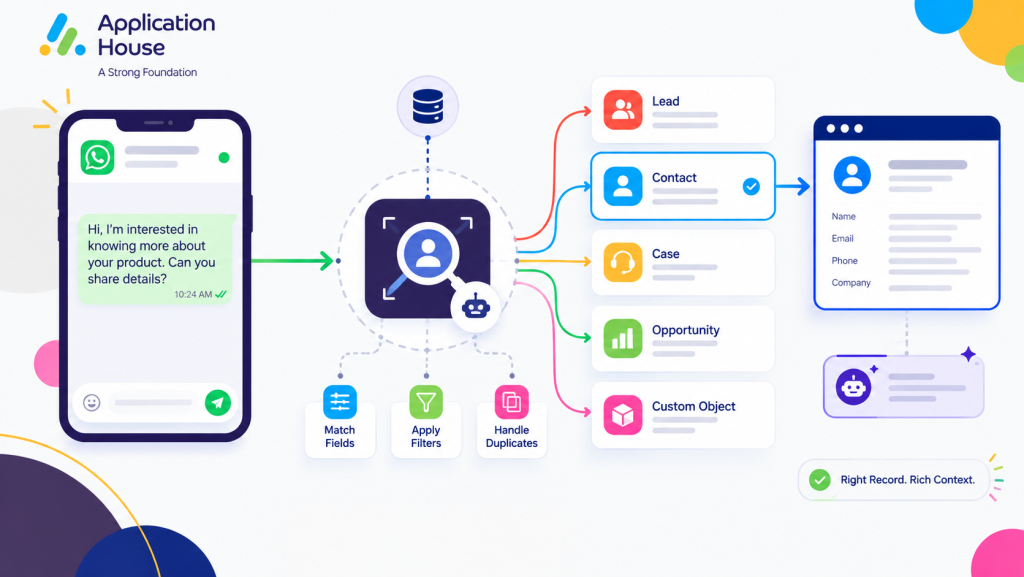
Identify the Right Salesforce Record for Every WhatsApp Conversation
You can configure how your application should identify the Salesforce record associated with your incoming WhatsApp message.
You can use your own Salesforce fields and business conditions to determine which record should provide the context for your conversation.
You can keep your WhatsApp communication connected to the record where your users already manage your customer relationship.
Find Existing Records Using Your Own Matching Rules
You can choose which Salesforce fields your application should use when searching for your existing customer record.
You can configure your matching rules around the data your organisation already trusts for identifying your customers.
You can use your own field mappings instead of depending on one predefined matching field.
Search Across Multiple Salesforce Objects
You can use Salesforce Flow when your customer may need to be found across multiple Salesforce objects.
You can build your own logic to search your Leads, Contacts, Cases, Opportunities or custom objects before your conversation continues.
You can use your Salesforce process to determine which object and record should provide the context for your incoming WhatsApp enquiry.
Apply Your Business Conditions Before Selecting the Record
You can apply your own conditions when your matching process needs more than a simple customer identifier.
You can use your custom Salesforce filter to narrow your matching results according to your business requirements.
You can make your record selection more relevant when your organisation stores similar customer information across different records.
Use Different Record Management for Different WhatsApp Numbers
You can configure your Record Management around the WhatsApp numbers your organisation uses.
You can give your different business numbers different Salesforce objects, matching rules and handling processes.
You can create multiple Record Management configurations when your WhatsApp numbers support different departments, locations or customer journeys.
Connect Different Numbers to Different Salesforce Processes
You can use one WhatsApp number for your sales enquiries while you use another number for your service or operational conversations.
You can configure each of your numbers around the Salesforce process that belongs to that type of customer enquiry.
You can keep your incoming conversations organised without forcing every WhatsApp number to follow the same record logic.
Choose Which Salesforce Object Each Number Should Use
You can configure your WhatsApp number to work with the Salesforce object that best represents your business process.
You can connect your sales number to your Lead process while you connect another number to your Case, Opportunity or custom object process.
You can keep your different customer journeys separate while you manage all your conversations inside Salesforce.
Assign Your Agentforce AI Agent to the Relevant Record Management
You can select your Agentforce AI Agent as part of your Record Management configuration.
You can use different Agentforce AI Agents for different WhatsApp numbers and different customer processes.
You can give your AI Agent the Salesforce record context your application has already identified before your automated conversation continues.
Turn Real Estate WhatsApp Enquiries into Salesforce Records
You can use your WhatsApp Record Management when your buyers, tenants, sellers or landlords contact you about properties.
You can identify your existing customer record or create your new enquiry record when your customer contacts you for the first time.
You can keep your property conversation connected to the Salesforce record your users need for their next action.
Match Buyers and Tenants to Existing Salesforce Records
You can match your incoming buyer or tenant message to your existing Lead, Contact or other Salesforce record.
You can keep your property conversation connected to your existing customer relationship instead of creating another record unnecessarily.
You can give your real estate users immediate context when your customer responds through WhatsApp.
Create New Records from Property Enquiries
You can create your new Salesforce record when your incoming WhatsApp message represents a new property enquiry.
You can configure your field mappings and your new record owner according to the way your property business handles new enquiries.
You can move your WhatsApp enquiry into your Salesforce sales process without asking your user to create your record manually.
Connect Property Conversations to Your Custom Salesforce Objects
You can use your custom Salesforce objects when your real estate process uses specialised records for properties, viewings or enquiries.
You can connect your incoming WhatsApp conversation to the record that represents the property process your users are managing.
You can keep your customer conversation and your property information together inside your Salesforce environment.
Manage Mortgage WhatsApp Enquiries Across Different Borrower Records
You can use your WhatsApp Record Management to identify the Salesforce record associated with your borrower.
You can connect your borrower conversation to your Lead, Contact, Opportunity, mortgage application or another Salesforce object your organisation uses.
You can keep your borrower communication connected to the correct mortgage process even when your Salesforce data contains several related records.
Find Existing Borrowers from Incoming WhatsApp Messages
You can use your matching rules to find your existing borrower when your customer sends you a WhatsApp message.
You can choose your fields and filters according to the information your mortgage organisation uses to identify your borrower.
You can help your users continue your borrower conversation with the Salesforce context they already need.
Create New Mortgage Enquiry Records
You can create your new mortgage enquiry record when your incoming WhatsApp message comes from a prospective borrower who is not already represented in your chosen process.
You can map your information into the Salesforce fields your mortgage users need.
You can assign your new record to the appropriate Salesforce user as part of your configured process.
Connect Borrower Questions to the Relevant Application Record
You can connect your borrower conversation to the Salesforce record that represents the mortgage application your users are managing.
You can keep your document questions, application enquiries and progress conversations within the correct business context.
You can give your mortgage users the record information they need before they respond to your borrower.
Manage Education and Healthcare WhatsApp Enquiries with Different Record Rules
You can configure different Record Management processes when your education, pharmacy or hospital conversations need different Salesforce outcomes.
You can use different objects, phone numbers, matching logic and record creation rules according to your business process.
You can keep your customer or student conversation aligned with the Salesforce record your authorised users already manage.
Connect Student Enquiries to Admissions Records
You can match your incoming student WhatsApp message to your existing enquiry, applicant or admissions record.
You can create your new Salesforce record when your prospective student contacts you for the first time.
You can keep your course questions, application enquiries and admissions conversations connected to your student journey.
Match Pharmacy Messages to Customer Records
You can use your Record Management to identify the Salesforce record related to your pharmacy customer.
You can keep your prescription, collection or service enquiry connected to the Salesforce record your authorised users work with.
You can create your new record when your pharmacy process requires a new customer or service enquiry to enter Salesforce.
Connect Hospital Enquiries to Patient or Appointment Records
You can connect your incoming WhatsApp message to the Salesforce record your hospital uses for the relevant patient interaction or appointment process.
You can use your matching rules to locate the appropriate record before your authorised user continues the conversation.
You can keep your appointment questions, visit enquiries and supported patient communication connected to your Salesforce process.
Let Agentforce AI Agents Continue from the Record Your App Finds
You can use your Agentforce AI Agent after your Record Management has identified the Salesforce record associated with your incoming WhatsApp conversation.
You can give your AI Agent the Salesforce context your conversation requires before your automated response continues.
You can use your Agentforce AI Agent for routine sales or support enquiries while you keep your Salesforce users available for conversations that need human involvement.
Use the Matched Salesforce Record for Your AI Conversation
You can let your Agentforce AI Agent work with the Salesforce record your Record Management process has identified.
You can keep your AI conversation connected to your customer data instead of treating your WhatsApp message as an isolated interaction.
You can use your record context to support a more relevant automated customer conversation.
Let Your AI Agent Handle the Incoming WhatsApp Enquiry
You can configure your Agentforce AI Agent to respond when your customer sends an incoming WhatsApp message.
You can use your AI Agent for your sales enquiries, support questions or other conversations you choose to automate.
You can configure multiple Agentforce AI Agents when your different WhatsApp numbers or business processes require different automated conversations.
Let Your Salesforce User Take Over with the Record Context Intact
With Application House, you can let your Salesforce user take over when your customer conversation needs human involvement.
You can keep your Salesforce record and your previous WhatsApp conversation available when your user takes responsibility for the interaction.
You can give your user the customer context they need without asking your customer to repeat the conversation.