
Automatically Find Any Salesforce Record for Incoming SMS
Automatically Find Any Salesforce Record for Incoming SMS
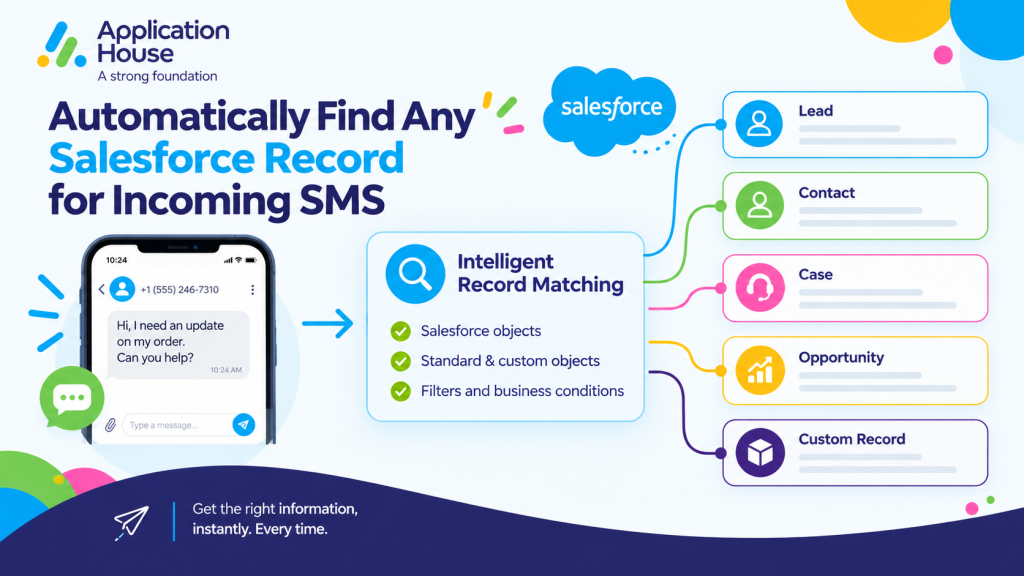
You can automatically find the Salesforce record that belongs to an incoming SMS instead of asking your users to search for the customer manually.
You can configure your Record Management around the Salesforce objects, fields and business rules your organisation already uses.
You can work with your standard Salesforce objects or your custom objects, so your incoming SMS can become part of the correct customer, enquiry or business process.
You can also decide whether your incoming SMS should match an existing record, create a new record or remain as a conversation until your user decides what should happen.
Find the Right Salesforce Record When an SMS Arrives
You can configure how your application should search for the Salesforce record connected to your incoming SMS.
You can choose your Salesforce object and define the information your application should use when looking for your existing record.
You can keep your record matching aligned with your Salesforce data model instead of relying on one fixed record type or one fixed matching rule.
Search Your Standard and Custom Salesforce Objects
You can use Record Management with your standard Salesforce objects or your custom Salesforce objects.
You can connect your incoming SMS to records such as your Leads, Contacts, Cases, Opportunities, Orders, Quotes or other records your organisation uses.
You can also use your own custom object when your business process requires records such as mortgage applications, property enquiries, student applications or other specialist records.
You can keep your incoming messaging connected to the Salesforce object that actually represents your process.
Match Your Incoming SMS Using Your Own Salesforce Fields
You can choose the Salesforce fields your application should use when finding your existing record.
You can configure your field mappings around the data your organisation trusts for customer identification.
You can use your matching configuration to help your incoming SMS reach the record where your users already manage the customer relationship.
Apply Your Own Salesforce Filter Before Selecting a Record
You can apply your own Salesforce filter when your matching process needs additional business conditions.
You can use your SOQL WHERE Clause to narrow your search when the same customer information may appear across several records.
You can make your matching process more specific to the way your organisation structures and manages its Salesforce data.
Decide What Happens When More Than One Salesforce Record Matches
You can control what your application should do when your incoming SMS matches more than one Salesforce record.
You can choose the duplicate handling approach that best fits your Salesforce process.
You can avoid forcing your users into one fixed duplicate rule because your configuration lets you decide how your matching result should be handled.
Use Your Oldest Matching Record
You can choose your oldest matching Salesforce record when your business process treats your earliest customer record as the primary record.
You can keep your incoming SMS connected to the record your organisation considers the established customer relationship.
Use Your Newest Matching Record
You can choose your newest matching Salesforce record when your latest record represents your current enquiry or active business process.
You can direct your incoming SMS towards the record that best reflects your most recent customer interaction.
Create Your New Record Instead
You can choose to create your new Salesforce record when your duplicate matching result should not automatically select one of your existing records.
You can keep your customer conversation moving while your Salesforce process creates the record your users need.
Connect Incoming Mortgage SMS to the Right Borrower Record
You can use your Record Management to connect incoming borrower SMS replies to the Salesforce records where you manage your mortgage process.
You can match your borrower to an existing Lead, Contact, Opportunity or mortgage application record depending on how your Salesforce organisation is configured.
You can keep your borrower replies connected to the correct application context instead of leaving your users to identify the record manually.
Match Borrower Replies to Existing Mortgage Enquiries
You can match your borrower reply to the existing Salesforce record that contains the information your mortgage users are already working with.
You can keep your borrower questions, status responses and follow up messages connected to the same enquiry or application journey.
You can give your users immediate context when your borrower responds by SMS.
Connect Document Responses to Mortgage Application Records
You can connect your incoming SMS response to your mortgage application record when your borrower replies about required documents or outstanding information.
You can keep your SMS conversation alongside the Salesforce record where your users track the application.
You can reduce your manual searching when your borrower responds to a document request or application update.
Create New Borrower Records from New SMS Enquiries
You can create your new Salesforce record when your incoming SMS represents a new borrower enquiry.
You can configure your field mappings and your new record owner so your enquiry enters the Salesforce process your organisation already follows.
You can move your new SMS enquiry into your mortgage workflow without requiring your user to create the record manually.
Connect Pharmacy and Hospital SMS to the Right Patient or Customer Record
You can use Record Management when your pharmacy or hospital receives incoming SMS responses that need to be connected to the relevant Salesforce record.
You can configure your matching around the Salesforce objects and fields your healthcare process uses.
You can help your authorised users find the conversation context associated with the customer, appointment or service record they already manage.
Match Prescription Replies to Existing Pharmacy Records
You can match your customer response to the Salesforce record your pharmacy uses for the relevant customer or service interaction.
You can keep your prescription collection responses, medication related enquiries or service replies connected to the record your authorised users already access.
You can reduce your need to manually identify the customer each time your pharmacy receives an SMS response.
Connect Appointment Responses to Hospital Records
You can connect your incoming appointment response to the Salesforce record your hospital uses for the relevant interaction.
You can keep your confirmation, rescheduling request or other supported appointment communication connected to the same Salesforce process.
You can give your authorised users a clearer view of your communication before they continue the conversation.
Create New Records from New Healthcare Enquiries
You can create your new Salesforce record when your incoming SMS represents a new enquiry that does not already have a matching record.
You can choose your object, your mapped fields and your record owner according to your healthcare process.
You can keep your new enquiry inside Salesforce from the beginning instead of asking your users to recreate the information later.
Use Salesforce Flow for Advanced SMS Record Matching
You can use Salesforce Flow when your record matching requires logic beyond a straightforward object and field configuration.
You can build your own process for finding the record your incoming SMS should use.
You can use your Flow logic when your organisation needs to search across several objects or apply more complex business conditions.
Search Across Multiple Salesforce Objects
You can use your Flow to search across multiple Salesforce objects when your customer may exist in more than one part of your data model.
You can define your own logic for deciding which Salesforce record should become the context for your incoming SMS.
You can support more complex organisations where your enquiry might relate to a Lead, Contact, Case, Opportunity or custom record.
Apply Your Business Conditions Before Selecting a Record
You can use your own conditions before your application decides which Salesforce record should be used.
You can include your business rules when your matching process depends on more than a single phone number or customer field.
You can keep your incoming SMS handling aligned with the same logic your organisation already uses elsewhere in Salesforce.
Use Your Own Logic for Complex Customer Enquiries
You can implement your own Salesforce logic when your enquiry needs additional qualification before your record is selected.
You can use your Flow to determine which object, record or process should handle your customer conversation.
You can keep your Record Management flexible as your Salesforce processes become more advanced.
Keep Unmatched SMS Conversations Available for Review
With Application House, you do not have to force every incoming SMS onto a Salesforce record immediately.
You can choose the None Record Management option when your organisation wants to capture the conversation first and decide on the relevant Salesforce record later.
This gives your users time to understand the enquiry, review the incoming message, and then select or create the appropriate Salesforce record
when they are ready.
Create Your Conversation Without Immediate Record Matching
You can allow your incoming SMS to create your conversation without immediately associating it with a Salesforce record.
You can keep your customer message available for review while your user decides how the enquiry should be handled.
You can use this approach when your incoming message does not provide enough information for confident automatic matching.
Let Your User Connect the SMS to the Right Record Later
You can let your Salesforce user review the conversation and connect it to the appropriate record when more information becomes available.
You can avoid creating an incorrect record association simply because your incoming SMS could not be matched automatically.
You can keep the power in your hands by choosing when your automation should make the decision and when your user should make it.