
Send WhatsApp Messages from Salesforce
If you already use Salesforce to manage your Leads, Contacts, Accounts and customer conversations, you can also use WhatsApp without moving your communication away from Salesforce.
When you send WhatsApp messages from Salesforce, your team can communicate with customers while keeping messages connected to the Salesforce records they already use. This can make follow-ups easier to manage and gives you a clearer view of customer conversations.
Why Send WhatsApp Messages from Salesforce?
WhatsApp is widely used for quick customer communication. By connecting WhatsApp with Salesforce, you can use customer information already stored in Salesforce when sending messages.
You can use WhatsApp from Salesforce to:
Follow up with new leads
1 Confirm appointments and meetings
2 Send order or service updates
3 Answer customer questions
4 Remind customers about upcoming activities
5 Keep conversations linked to customer records
6 Send messages to selected Salesforce records
7 This means your team can spend less time switching between different systems.
How to Send WhatsApp Messages from Salesforce
The process can be simple when you use a Salesforce WhatsApp messaging solution
such as AI SMS House.
You can typically follow these steps:
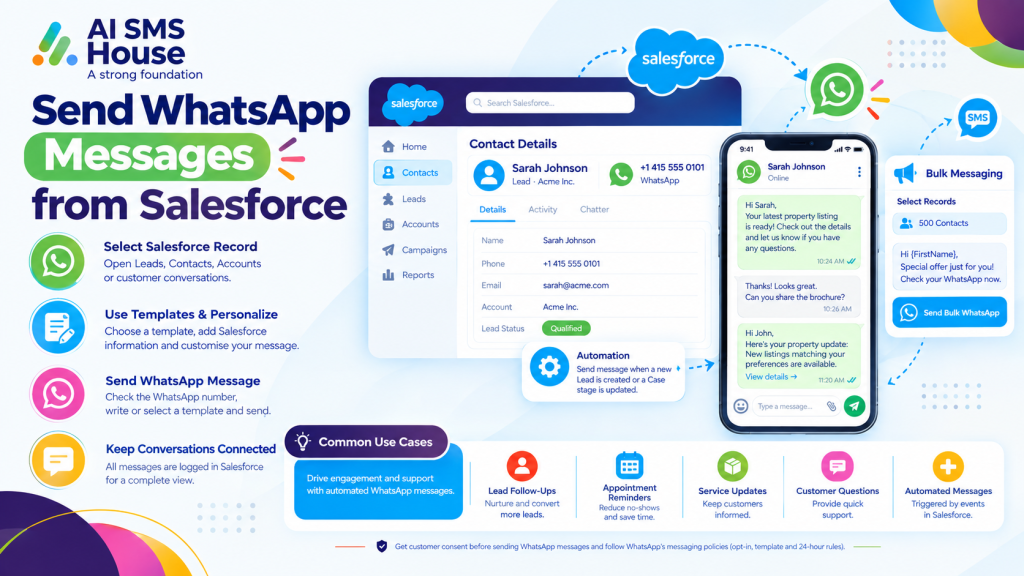
1 Open the relevant Lead, Contact, Account, Case or other Salesforce record.
2 Check the customer’s phone or WhatsApp number.
3 Open the WhatsApp messaging option available in Salesforce.
4 Write your message or select an approved template.
5 Add relevant Salesforce information where required.
6 Send the WhatsApp message.
Your team can then keep the conversation connected to the customer record rather than managing it separately.
Send WhatsApp Messages from Salesforce for Customer Follow-Ups
Following up quickly can be important when a customer has requested information or a lead has shown interest.
You can use WhatsApp to:
1 Follow up after an enquiry
2 Ask for additional information
3 Share a meeting confirmation
4 Remind a customer about an appointment
5 Continue a conversation after a sales call
Because the communication is connected to Salesforce, your team can see the relevant customer information before responding.
Send Bulk WhatsApp Messages from Salesforce
You may also need to contact multiple customers at the same time. Depending on your business requirements and messaging permissions, you can use Salesforce records, List Views, Campaigns or Reports to select recipients.
1 Common uses include:
2 Customer announcements
3 Event reminders
4 Appointment reminders
5 Service notifications
6 Marketing communications
7 Follow-up campaigns
You should always follow WhatsApp’s messaging rules and make sure you have the appropriate customer consent before sending messages.
Automate WhatsApp Messages from Salesforce
WhatsApp communication does not always need to be sent manually.
With Salesforce automation, you can trigger messages when certain conditions are met. For example, you could send a WhatsApp message after a new Lead is created, when an appointment is approaching or when a Case reaches a particular stage.
This can help you keep customers informed without requiring your team to manually send every message.
Use AI SMS House to Send WhatsApp Messages from Salesforce
Application House provides Salesforce-focused solutions and can help businesses make better use of Salesforce automation and connected applications.
For businesses already using Salesforce, keeping WhatsApp communication connected to the CRM can make everyday customer communication easier to manage.
If you want to explore the Salesforce messaging app, you can view AI SMS House on Salesforce AppExchange.
Final Thoughts
When you send WhatsApp messages from Salesforce, you can bring customer messaging closer to the information your team already uses every day.
From individual follow-ups and appointment reminders to automated and bulk communication, WhatsApp can support different parts of your customer journey while keeping conversations connected to Salesforce.