
Send Automated Text from Salesforce
Sending automated text messages from Salesforce can help you keep customers, leads and teams informed without relying on someone to send every message manually. You can use Salesforce data and automation to trigger a text at the right time.
With an SMS solution such as AI SMS House, you can connect text messaging with your Salesforce records and workflows. This means you can send relevant messages based on actions such as a new lead, appointment, case update or opportunity stage.
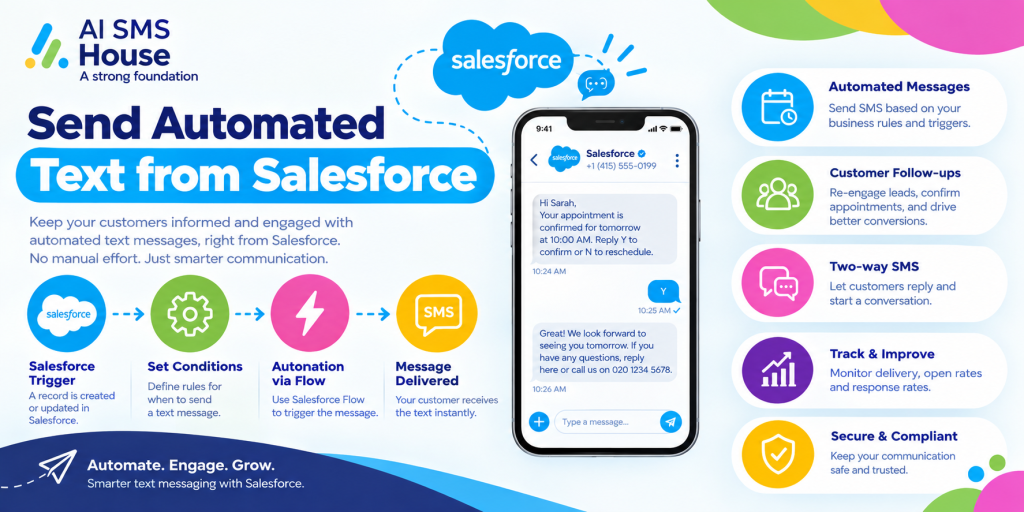
How to Send Automated Text from Salesforce
The basic process is straightforward:
1 Connect your Salesforce org with an SMS messaging solution.
2 Select the Salesforce records that should receive messages.
3 Create your SMS templates.
4 Set up Salesforce Flow or another automation.
5 Choose the event that triggers the message.
6 Send the automated text and track its status from Salesforce.
For example, when a new lead is created, you can automatically send a welcome text. When an appointment is approaching, you can send a reminder without asking your team to do it manually.
Send Automated Text from Salesforce for Lead Follow-Up
When a new lead enters Salesforce, speed matters. Instead of waiting for a sales representative to contact the lead, you can trigger an automated text as soon as the record meets your chosen criteria.
You could send:
1 A welcome message after a form submission
2 A follow-up after a sales enquiry
3 A link to book a meeting
4 A reminder about an unanswered enquiry
5 A confirmation when a lead becomes qualified
This gives your sales team another way to keep the conversation moving while keeping all customer information within Salesforce.
Automated Customer Appointment Reminders
Businesses that manage appointments can use Salesforce automation to send reminders before a scheduled meeting or service.
For example, you can send a text 24 hours before an appointment with the date, time and relevant instructions. You can also send a same-day reminder if required.
This can be useful for:
1 Healthcare providers
2 Estate agents
3 Mortgage advisers
4 Education providers
5 Professional services
Send Automated Text Messages from Salesforce for Case Updates
Customer service teams can also use automated SMS notifications when a Salesforce Case changes.
You could automatically tell a customer that:
1 Their case has been received
2 A support agent is reviewing the issue
3 More information is required
4 The case has been resolved
5 An important update is available
Your team does not need to copy information from Salesforce into another messaging platform each time a Case changes.
Automated Texts for Sales Opportunities
Sales teams can trigger messages from Opportunity activity too.
For example, when an Opportunity moves to Closed Won, you could automatically send a thank-you message. You might also send a follow-up text when a prospect reaches a particular stage in your sales process.
How Salesforce Automation and SMS Work Together
Salesforce Flow can determine when a message should be sent, while your SMS solution handles the delivery.
A simple workflow could look like this:
Salesforce event → Automation rule → SMS template → Text message → Delivery status
For example:
New Lead → Salesforce Flow → Welcome SMS → Customer receives text → Status tracked in Salesforce
This approach lets you build messaging into processes you already use instead of creating another disconnected system.
AI SMS House can be used to bring SMS messaging into your Salesforce processes. You can use it for automated notifications, customer communication and follow-ups while keeping messaging connected to Salesforce records.
Application House provides Salesforce-focused solutions and can help businesses make better use of Salesforce automation and connected applications.
Find More Information on Salesforce AppExchange
You can find more information about AI SMS House and its Salesforce messaging capabilities on Salesforce AppExchange:
Send SMS from Salesforce | Send Text from Salesforce | Send WhatsApp Messages from Salesforce
Final Thoughts
When you send automated text from Salesforce, you can reduce repetitive communication and respond to customers at the right point in your business process.
Whether you need lead follow-ups, appointment reminders, Case updates or sales notifications, automation can take care of routine messages while your team focuses on conversations that need a human touch.